For discussions on this and other topics, register today at tonymacx86.com!
MultiBeast Overview Video
Posted by
tonymacx86
on Wednesday, February 08, 2012
Labels: Mac, MultiBeast, OS X, Snow Leopard, Video
UniBeast 1.1 Update
Posted by
tonymacx86
on Saturday, February 04, 2012
Labels: installer, Lion, Mac, OS X, UniBeast, Utilities

Today UniBeast has been updated to 1.1. After a bit of testing, we've optimized this utility for use with the newly updated 10.7.3 Mac OS X Lion App. The latest version is available for download at tonymacx86.com/downloads.
Please do not upload or redistribute UniBeast to any other sites.
Full list of changes:
- Updated Chimera to v1.7.0
- USB Fix for 10.7.3
If this utility has helped you, please consider a contribution to support further UniBeast development. Thanks in advance, and enjoy!
UniBeast: Install Mac OS X Lion Using an All-In-One Bootable USB Drive
For discussions on this and other topics, register today at tonymacx86.com!
rBoot 1.1 Update
Posted by
tonymacx86
on Friday, February 03, 2012
Labels: Lion, Mac, OS X, rBoot, Snow Leopard, Utilities

Today rBoot, the boot CD for both Snow Leopard and Lion has been updated to 1.1. The standard version, and a laptop edition (rBoot LE) are now available for download at tonymacx86.com/downloads.
Please do not upload or redistribute rBoot to any other sites.
Full list of changes:
- Updated Chimera to v1.7.0
- USB Fix for 10.7.3
If this utility has helped you, please consider a contribution to support further rBoot development. Thanks in advance, and enjoy!
Update Your Mac OS X Lion App to 10.7.3 [QuickTip]


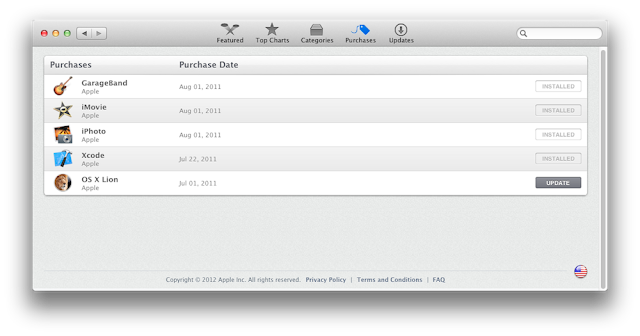
When the download finishes, the app will automatically open. The updated 10.7.3 Install Mac OS X Lion App can be found in the Applications folder.
If you don't see the Update button, follow this simple procedure.
2. Hold down the alt/option key on your keyboard, and click the App Store icon.
3. With alt/option key held, click on Purchased
4. With alt/option key held, click on OS X Lion
5. With alt/option key held, click on Install
1. Open System Preferences
2. Click on Accounts
3. Click Lock Icon
4. Click (+) to add a new User
5. Create a new Admin User
6. Log out, and log into new User
7. Proceed with steps above.
Related Posts:
For discussions on this and other topics, register today at tonymacx86.com!
Mac OS X 10.7.3 Update

Today Apple released Mac OS X 10.7.3 the 3rd major update to Mac OS X Lion. To eliminate any potential issues, we generally recommend to update any supported systems using the standalone Combo installer, and not the built-in Software Update.
Be sure to back up any important data, and if possible clone your hard drive before applying the update. If you have any issues post-update, boot using UniBeast or rBoot.

What we know about 10.7.3 so far...
- 11.3.0 Darwin kernel
- Improved AMD, Intel, and NVIDIA graphics drivers.
- If you use customized or edited graphics kexts, it will be necessary to make the edits again using the new drivers as a base.
- The update will replace your AppleHDA.kext.
- If you use ALC8xxHDA for onboard audio, you will have to reinstall AppleHDA Rollback using MultiBeast before rebooting.
- If you use toleda's new AppleHDA for onboard audio, you will need to reinstall it before rebooting.
- If you use VoodooHDA, you will not need to make any modifications.
- If you use Sleepenabler.kext, remove before updating.
Good luck, and let us know how it goes! Report your results in the forum here.
Related Posts:
For discussions on this and other topics, register today at tonymacx86.com!