
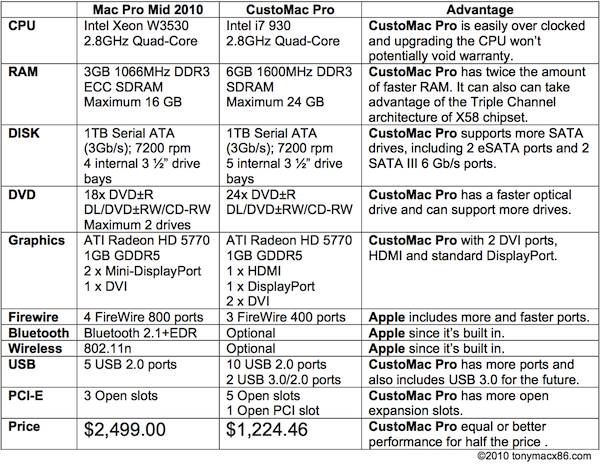
Apple recently released details of the upcoming Mac Pro Mid 2010 refresh, and we thought it might be interesting to do a speculative build based on some of the same or equivalent parts.
So here are the details on how you can build this CustoMac. As always, CustoMac builds are compatible with iBoot + MultiBeast and designed to run Mac OS X as the primary operating system.
CustoMac Pro 2010
Core i7-930 - Gigabyte GA-X58A-UD3R - ATI 5770 1GB - 6GB DDR3 RAM
$1224.46
CPU: Intel Core i7 Processor i7-930 2,8Ghz $289.99
Motherboard: Gigabyte GA-X58A-UD3R LGA1366 Motherboard $209.99
RAM: OCZ 6GB Triple Channel Kit DDR3 1600 MHz PC3-12800 $149.99
Case: Cooler Master HAF 922M $89.99
Operating System: Mac OS X Snow Leopard $26.35
Optional Accessories
Apple Wireless Keyboard $68.99
Apple Magic Trackpad $69.00
Oh, and don't forget, if you end up buying anything, click through one of the links above, or in the sidebar. That way, you'll be supporting the site, as well as getting the best prices. Thanks in advance!
For the first article in this series, see Building a CustoMac: 3 Complete PC Builds for OS X.



99 comments:
Wow, great!
I'll upgrade :-))
I was hoping you'd post this when I saw the new Mac Pro. :)
Awesome! You guys rule.
Cool! I just ordered the almost exact configuration from iBuypower except for the video card (I got an NVidia GTS 250). Should be here in a week or so now. So all I need is iBoot-Multibeast and the system should be operational in 10.6.4 right?
@ Anonymous....Kind of...you'll have issues with that GTS 250 if you're going to be using HDMI on a HDTV. If I were you, I would send that 250 back and pick up a 5770. Has better performance and is only $150 or less depending on where you buy it, and it has full HDMI 1080P with Audio.
Jay
Thanks for comments everyone- accidentally rejected a few- please repost. :)
-mgmt
How is ATI 5xxx support looking these days? In my first CustoMac Pro build, I went i7-860 with a GeForce 9800 GT (as I think many did), and in doing so actually sold my ATI 4850 as driver support was shaky at that time.
I would love to return to the ATI family with a 5870 or something, but would definitely want vanilla support for it before moving back to it.
Tony,
You mentioned in this post that 5000 series is not supported in 10.6.3 but in this build you recommend getting 5770. Does this card work in OSX without drivers?
http://www.tonymacx86.com/viewtopic.php?f=15&t=496
Does the 5770 still only work in 32bit?
Will pick this setup up as well, Thanks alot for post. Im also keen to get a 5870, will this currently work?
Thanks.
Also wondering about the 5870... Looks like an awesome card, and seems to have vanilla support if Apple sells it... can anyone confirm?
On netkas' blog (today) he mentions that he has already cobbled together something for the 5770's and should have an even better one when the first mac pros land.
I don't know about you guys but having netkas actively working on support for a particular card is a biggie for me. We may have just lucked out with the use of the 5770's.
Hello Tom,
I urgently needs your help.
I am founded the CustoMac per 2010 exactly like in your instructions. But instead of 6 GB with 8 GB. As 1-st operating system take I Snow Leopard 10.6. Can I instal with "Parallels Desktop as 2-nd operating system Windows 7?
Thank you for your answer.
Arno
is all the hardware that posted up there work exactly the same as real mac pro??
what about audio?
Hi,
I spotted the link to this page on XLR8. I am from Scotland and it often annoys me to see these projects posted with no UK information. So, i have googled up the stuff from above and have found the following. Keep in mind that these prices are what the buyer actually pays. They include VAT, but not any delivery charges.
1. CPU: Intel Core i7 Processor i7-930 2,8Ghz £222.40
2. Motherboard: Gigabyte GA-X58A-UD3R LGA1366 Motherboard £173.50
3. Graphics: Diamond ATI Radeon HD5770 1GB GDDR5 £143.50
4. RAM: OCZ 6GB Triple Channel Kit DDR3 1600 MHz PC3-12800 £146.92
5. Hard Drive: Samsung Spinpoint 1 TB £47.25
6. CD/DVD Burner: Sony Optiarc Black £18.34
7. CPU Cooler: Scythe Mugen 2 £36.95
8. Case: Cooler Master HAF 922M £85.65
9. Power Supply: Corsair TX 850-Watt £118.50
10. Operating System: Mac OS X Snow Leopard £25.00
11. Wired Keyboard with Keypad £39.00
12. Magic Mouse £56.00
13. Targus Bluetooth Adapter £5.99
GRAND TOTAL IS £1119.00
Thanks for the timely CustoMac Pro post. Because I was on the edge of ordering anyway, I ordered your parts today from Amazon through your links. (Some of their prices went up a few bucks overnight).
Beginning Sat. I'll be posting results and maybe asking a few questions. I've failed on all my 5-6 year old Dell attempts.
Hello Tony hope u doing good, im going to build the custom mac pro but 2 questions.
1.- it is possible to have a better Video card like a ATI 5870 and dont have any issues? or have a dual crossfire 5770?
2.- what would be good for audio?
Wouldn't building the a machine with an actual Xeon processor give more of an "Apples" to "Apples" comparison in price? You are comparing a Workstation class processor to a consumer level processor, of course your system is going to be cheaper. There are 2 schools of thought replicate the Mac Pro and see what the price differential is. Build the System that _you_ want and compare prices to the closest thing you can get from Apple. In this case you would like a true desktop computer without monitor. From apple your choice is a Mac Mini or a Mac Pro. This machine falls right in between.
Cool write up. I'm book marking the site now.
MJ.
@MJ.
Thanks for the comment- appreciate the feedback!
Here's the product pages on Intel's site for comparirson. The specs are absolutely identical besides multi-cpu support and Demand Based Switching technology with the Xeon.
Intel® Core™ i7-930
Intel® Xeon® W3530
Not to mention that the prices on both CPUs are identical as well. :)
W3530 doesn't support multi-cpu...so they're really the same chip in different clothes.
Ummm, the memory is 1600MHz DDR3 memory kit.
According to the Gigabyte Web site:
Support for DDR3 2200/1333/1066/800 MHz memory modules
Doesn't the MB need to support 1600MHz RAM?
I ordered everything a few days ago, but I just noticed this discrepancy.
You forgot to mention SSD. One 64GB V Series SSD from kingston is awesome. Tho of those in raid is wow. Now try 8 of those.
Of-course I dont run 8 ssd in raid but i gave those a try and returned 6 of them. But I am telling you, 8 ssd in raid is something.
any case recommendation that doesn't look like it is for a 15 year old (or 22 year old Fast & Furious character)?
I'm looking into the P183
I got the Antec P183 case. Large and quiet. If you get the antec case, get the antec 850W power supply as it has long cables for the case.
silverstone make a nice case, quite a few.
... I love the Lian Li stuff... built to last...
Hey Tony, " Building a Customac-pro 2010 " got mention over at www.XLR8YourMac.com! Awesome! Goes to show that all of your hard work (and everyone's here) is getting recognition, especially on "Apple" related websites. Keep up the good work!
Hey guys, would any case fit all these components. Im looking for a case thats around £90 has great cooling but again doesn't look like a 16 year olds
Hey Tony, how soon do you think CustomBeast can offer support for the GA-X58A-UD3R motherboard? The config is really awesome, I just want to make sure all the pieces function as they should before I buy. (I'm a hackint0sh noob as well :)
Cheers!
Hi Tony !, i bought this combo almost a month ago :
- intel i7 930
- Asus P6x58D Premium
- XFX Ati Radeon 5770 1 Gb DDR5
- 6 GB (3x2) Kingston HyperX DDR3 2000 MHz
- WD 1 TB Caviar Black Sata 3 6 GB/s
I should do it well with this??, mem's are 2000MHz, is this the same or it will not work??
im noob on hackintosh, so i ask you:
if I just simply follow your guide using "iBoot vainilla kernel", i should do this fine ?
Excuse my english!!
Greeting from Argentina :)
Love to get the ATI 5870 card working!
The Xeon costs significantly more than an i7 and supports ECC.
You get a warranty that if any component breaks you have one point of contact. The industrial design is better. You don't have to assemble it. There is no guaranty that it will still work after the next Apple update.
I have a host of other issues.
I'll stick with my MacPro.
The "industrial design is better" comment is nonsense. Are you basing that on Apple's lowest-bidder power supplies and motherboards? Also did you go with the free 1-year warranty (which is far shorter than what everyone else will have on the independent parts), or did you fork over an extra $250 for the 3-year plan?
If you're not really discriminating and assembly is a big deal for you, then you probably should stick to your MacPro. Meanwhile some of us who aren't so helpless and clueless about what is actually under the hood of a Mac would like to carry on here.
How about posting a similar component list for the 8 core version?
And, is there a way of seeing this proposal tested by some knowledgeable guys before someone who is inexperienced with building a computer from scratch is let loose on it? How about that potential issue with updates by Apple made to their OS?
I admire your stamina and share the sense of frustration with Apple's pricing stance and restrictions made on third-party vendors, but i would really like to see a report posted by someone who has actually built this Hackintosh system and gotten it r=to run, and run very well, I might add.
Thanks,
JK
Well I have seen in this post: http://www.insanelymac.com/forum/index.php?showtopic=220199
that what we might get is the GA-X58A-UD3R (rev 2.0) which seems not to be as straight forward as rev 1. As the previous posted said is there any of you who already build it? how is it benchmarking? Post some comments an maybe point to a very straight forward guide on how to make it happen :)
Hi Guys, I took the plunge and ordered the exact components two days ago .. now eagerly waiting for arrival.
I have no idea which revision of the UDR3 board I'll recieve ( wasn't listed when bought ).
Am a complete newbie on hackintosh, but built many pc's before.
Hopefully many others are building the same thing too, so we can share experiences !
btw Tony, thanks for a great website and all the work, donation coming as soon as it runs !!
Hi all,
I have built a very stable working "HackPro" similar (but not identical) to the above. Yes, it is true that with a Hackintosh you run the risk of the next 10.6.x update "breaking" your system, but it is a very minimal risk at this point, and also, if you are a person of patience who does not feel a compulsion to immediately update to that next update, generally within a week, Tony and the folks here have resolutions posted for any issues encountered. That's the power of buying components that everyone else here is using -- we have a solid support community amongst ourselves.
So yes, if you want an "idiot-proof" system, by all means drop $2500 on this hardware from Apple in your shiny aluminum case.
Otherwise, save yourself $1500 and develop some patience.
Is there no DSDT available for this board? I went to Download the DSDT from the database and its not listed.
-John
Has someone built this setup or is it just a mock set up. Let me know if ou have and if it works with ease!
Can anyone give their comment on the following hardware config. Components marked with a star are different from the CustoMac Pro 2010. Thanks!
CPU
Intel lga1366 i7 930 - Quad core+Hyper-Threading / 8 threads , 2.88ghz box cpu / 3.06ghz turbo boost
*MBOARD
ASUS Rampage 2 Gene
*GRAPHICS
Asus EAH5770 CuCore/2DI/1GD5
*RAM
Corsair CMX6GX3M3A1600C9 , XMS 3 , with heatsink
*HDD
Western Digital caviar blacK WD1002FAEX , 1Tb/1000gb , Sata6G , dual processors unit with 64mb cache , 7200rpm - 5 years warranty
*DVDRW
LG GH24NS50 , 24x , Sata , black , support SecurDisc technology
*CPU COOLER
Coolermaster V8
CASE
Coolermaster HAF 922
*PSU
Coolermaster RS850-AMBAJ3 Silent power pro 850w
I'm also intrested at the RAM question by Odinian:
Does the Motherboard support the 1600MHz clock of the RAM module? Isn'it bether to take an 1066MHz one?
@The Sapient Mind
Can you give us more detail what are you running? What mobo/video are you using? I am in for the hack pro as well but waiting for a guide I can follow and trust. I thought this might be fine but the mobo rev 2.0 stopped me
Here's the compatibility list from Gigabyte for the UD3R board. Several 1600 options are listed.
http://www.gigabyte-usa.com/FileList/MemorySupport/mb_memory_ga-x58a-ud3r.pdf
Will it work for GA-X58A-UD3R (rev 2.0)? If there is an update, please, please, can we have that?
Desperate to start building the HackPro, but stopped due to the problem of rev 2.0 as noted in Addis post.
There aren't any reply buttons, but to the commentor who said:
"The 'industrial design is better' comment is nonsense," clearly you don't know what industrial design actually is. Industrial design is not the design of mobos/power supplies. As wikipedia defines it, "Industrial design is a combination of applied art and applied science, whereby the aesthetics, ergonomics and usability of products may be improved for marketability and production".
This is exactly where Apple crushes all its competitors, including whatever shitty Liam Li "Designed in Taiwan!" cases most hackintoshes live in. And I'm writing this from my Liam Li-housed hackintosh. I wish it all flowed together well, but it wasn't worth the extra $1k this time around.
Hi tonymacx86, good work so far! Your iBoot, Multibeast & CustoMac's are amazing. Perhaps you can present a "the cheapast but nearly full supported CustoMac by tonymacx86" with download button for iBoot & Multibeast and HowTo install. Haven't found something like this. I think your page is the best for newbies at all. in september (next money-check ;-) i'll make my obligational donation for your work here!
What's the GeekBench score of this thing?
Running the CPU at the stock clock and memory at 1600 MHz, I'm getting a Geekbench 64 score of 9927.
Tony,
+1 for JK's request - any chance you could offer a hardware list and build guide for the latest 8-core Mac Pro equivalent? I posted the same question in the forum recently:
http://www.tonymacx86.com/viewtopic.php?f=22&t=4876&p=34214#p34214
Tony,
Have you run into any of the common hack issues with sound or non-compatible drivers? I want to make sure everything works out alright before ordering all of the parts.
This looks fantastic, by the way!
MacManx86 - Any chance of you posting your DSDT? I've got one with everything working but the machine seems a bit sluggish. Lots of spinning beachballs.....
This option to build a HackPro is tempting. However those who like OSX and require reliability - do not forget that nothing beats a real mac and of course discounting the top end mac pro, Apple offer great deals in their refurbished section with 1 years support plus an option to extend it. I have just sold my 2009 MacPro 2X2.26 Xeon getting back almost as much as I paid for it which in this game is really very remarkable - this would never happen with PC equipment. Want an easy life buy a real Mac...
I just finished an installation using this exact same hardware for the most part, and I haven't gotten it to work yet. I had to use the ati iboot 5xxx-3 version (in the forums) to get the osx installer to run. Osx installs fine after that, but the audio and ethernet don't work and the video card only displays 1024 x 768. After updating to 10.6.4, then installing multibeast (easybeast) the machine crashes right after chameleon while the OS starts to load. I've reinstalled the os from scratch trying different multibeast configs, and had some luck using the dsdt from the database - but anytime any of the hacked .kexts get installed the system no longer works.
Does anyone have a thorough guide as to how they've gotten this hardware configuration to work? I'd be really sad if all i can run on this thing is… windows.
is it possible to use the as different graphic card the GIGABYTE GeForce GTX 285 instead of the Gigabyte ATI Radeon HD 5770 1GB GDDR5-would be much better performance-with the same configuration as you suggest for the customacpro 2010
Will there be a CustoMac mini someday?
@tonymacx86
is this the Gigabyte ATI Radeon HD 5770 1GB GDDR5 with 850MHz or with 960MHz?
Is this the Gigabyte GA-X58A-UD3R LGA1366 V1 or V2?
Though did not get any answer on Rev 2 motherboard, took the plunge and bought all the components - exact list as suggested in this article.
The CPU retail box also comes with a CPU cooler and I am not sure why we need the Scythe CPU cooler. Being the first PC I am building, do not know whether this is a silly question or not, but someone, please can clarify whether
a) Is Scythe CPU Cooler necessary or not?
b) Will there be any impact if I just use the intel CPU Cooler came in the retail box instead of using the Scythe one?
Thanks again, in advance.
Scythe is for overclocking. Intel should be fine if you are going to stay at 2.8
Manas, i am not an expert, but if you are seeing thar rev 2.0 bring problems, try to buy rev 1.0 in some web which has the motherboard 1.0.
Please post all your experiences when you test it to help to all the people like me who are expecting to buy a hackintosh pro.
Thanks
PD: please if someone more have buy this configuration, post your experiences
my hardware:
Gigabyte GA-X58A-UD3R rev. 2.0
Gigabyte GV R577UD-1GD
1x 1333 4GB "Corsair CMX4GX3M1A1333C9"
Retail DVD 10.6.1
Got black screen after step 7. of iBoot. Tryed all 3 iBoot discs and "-x"
HELP!!!
Same problem with OS X 10.6.3.
Seems like rev. 2 or graphic caused the problem.
The only thing i'd change is get rid of the heatsink/fan and get one of these:
http://www.corsair.com/products/h50/default.aspx
It works wonderfully on my setup, is far less heavy hanging off your board, and much much quieter (I do audio and the last thing I want to hear is my computer)
is was the graphic card, Do not use "iBoot ATI" use "iBoot ATI 5xxx" that will work
Why would you recommend the Apple wireless keyboard?
It is one big piece of crap!
You cannot press more then three buttons simultaneously, which ruins everything.
And Apple Magic mouse is also the worst, heaviest, unprecize, mouse that is out there in the market. Try to middle click through 3d max with that one.
I have the 27 i5 iMac and not even I use either of those.
Buy a normal keyboard and a normal mouse that you will be satisfied with, not Apple's crap. And it will lower the price nicely.
Otherwise a very smart choice of components,
The cooler is the best for its price, the optiarc is also the one I got me a year ago for my hacki, because it seemed to be the cheapest one out there. I paid 18 Euros for that.
@anonymous two posts up,
H50 is piece of crap, really stop giving advices. Go, read a book.
And istead of that trackpad I'd get a wacom tablet or something.
hii tonymac can u help me , i bought all my hardware exactly the same as customac pro , i install mac osx 10.6.3 and update to 10.6.4 , i have downloaded and install fce 4.0 and i run it and i get error msg : livetype recommends that your system have 64 mb of vram ; this system has only 0 mb of vram
livetype recommends that your system have a quartz capable video card
and i have install aperture3 i also get the error msg
pls help me i need my computer to fully work .thxx
The setup is working beautifully (all components are the same as in the list). Motherboard was rev 2-0.
I followed these 2 guides for dual boot to Win7 and Snow Leopard.
Guide 1 (Setup):
http://tonymacx86.blogspot.com/2010/04/iboot-multibeast-install-mac-os-x-on.html
Guide 2 (Dual Boot Guide): http://tonymacx86.blogspot.com/2009/11/dual-boot-windows-7-and-os-x-snow.html
Guide 3 (OS X):
http://www.tonymacx86.com/viewtopic.php?f=3&t=4837&start=0&sid=13f33a9d4bd9649811805376ad2014b5
Steps followed:
- Step 1 from Guide 1
- Step 1 and 2 from Guide 2
- All the points/steps from Guide 3
- Step 6 from Guide 2
From the first attempt itself, all worked fine, except for the following:
- Audio through HDMI in OS X (In Win 7, works fine)
- Wake up from sleep (Currently it does not wake up from sleep and hence have set "Never" in System Preferences)
- Yet to figure out how to make it wireless (through PCI slot or USB)
Any help on the above three points will be really appreciated.
This is bit like magic, especially considering that I still do not understand DSDT, kexts, etc.
Thanks a lot to Tony to make it happen!
at least pick a case that you can slap an apple logo and looks somewhat like an apple! sheesh!
like this one:
http://www.newegg.com/Product/Product.aspx?Item=N82E16811164061
i need help. i have almost everything listed here except the case. i got a antec 300 instead. after many many tries, i got snow leopard to load. i loaded multibeast, restart the system and now i cant get back into SL. :( this is very fustrating. i read lots of post online no one seems to have the answer for me. can some one help me out plz. on the verg of quits.
I have this exact setup. I've tried iBoot, Kakewalk, and Chameleon, and none of them seem to be able to get me to the snow leopard installation screen. (I am following directions for each one exactly) Somebody please help!
Question background: I am considering a new build for a dual-boot Win7 and OSX Snow Leopard. I have some questions about the pieces noted. Some general feedback on on the web is not very favorable regarding the OCZ DR3 memory used. I am considering the following.
1. CPU: Intel Core i7 X58 i7-950 3Ghz+
2. Motherboard: Gigabyte GA-X58A-UD3R LGA1366
3. Graphics: EVGA ATI Radeon HD5770 1GB GDDR5
a. Considering ATI 5870. Comments?
b. Are there any issues with EVGA vc's?
4. RAM: Corsair CMP6GX3M3A1600C7 "Dominator" DDR3 Memory - Tri Channel, 1600MHz, 6144MB (6 x 2048MB) 12gb
5. Hard Drive: Seagate or WD 2 TB partitioned
a. 1 Mac partition.
b. 1 Win 7 partition
c. By the way, are 6gb/s SATA III's OK?
6. CD/DVD Burner: Haven't decided
7. CPU Cooler: Corsair H50 or H70 water cooled.
Have'nt decided.
8. Case: Cooler Master HAF 922M £85.65
9. Power Supply: Corsair TX 850-Watt £118.50
10. Operating System:
a. Mac OS X Snow Leopard
b. Windows 7
11. USB keyboard and mouse (mouse wireless?)
12. HAF 932 Case.
13. Power Supply: 900 to 1000 watts. Undecided.
I will probably overclock the be-jesus out of this rig. After everything is installed. Any comments will be appreciated.
by: joe139
Why does this use ATI graphics instead of Nvidia? Are they better, faster, cooler, more compatible? Just wondering.
Also, what do you guys suggest as far as SSD Boot Drives go?
Would this rig be compatible with Adobe CS5 and Final Cut Studio?
-K
and why is everybody choosing the UDR3 board instead of UD5(I just dont get it...)? I want to build the same custommac but instead of the UDR3 I will put UD5 and go with an gigabyte hd5770 fanless card!
Will this work?
Hi i've got this build (for the most part, but different case) up and running and its working great - except for occasionally getting stuttering audio (especially in games). I'm using an external firewire audio device. Is this a speedstep issue?
I just ordered what I could find here in South Africa:
I really hope it works. Trying it for the first time.
Any Heads Up I need to know about?
GA-X58A-UD3R DDR3-2000+ GIGABYTE® X58A-UD3R: X58 & ICH10 Chipset - Socket LGA1366, QPI Interface Up to 6.4GT/s - Supports: Core i7 LGA1366 Processors
ATX 6x DDR3-2000+ Slots (Tri Channel), 6x SATA2 & 2x SATA3 RAID, 2x eSATA/USB Combo, 1x ATA133 & FDD, 12xUSB 2.0, 2xUSB 3.0, 3xIEEE1394
4x PCI Express x16 (2x16/2x8), 2x PCI Express x1, 1x PCI Slots, Realtek Gigabit LAN, 7.1 Channel HD Audio, Optical & SPDIF Ports
Ultra Durable 3 Features: 2oz Copper PCB, 50,000 Hour Solid Capacitors, Ferrite Core Chokes, Low RDS(ON) Mosfets
3 YEAR WARRANTY Dual BIOS™, Dynamic Energy Saver 2, EasyTune, Gigabyte Smart6, ATI Crossfire & nVidia SLI Support, AutoGreen, XHD, 3x USB Power
ULTRA DURABLE 3 Precision Overvoltage, Overclock Alert, TempAlert, Overvoltage Alert, QuickBoost Support, On/Off Charge
BX80601950 i7-950 Intel® Core™ i7 950 - 3.03GHz Quad Core, Socket 1366, 8MB L3, 4.8GT/s QPI, 45nm, x64 Support, Intel VT, 3 Year Warranty
GV-R577UD-1GD GIGABYTE® ATI® Radeon HD5770 - 1GB GDDR5, 128-Bit Memory Bus, PCI Express 2.0, 2x DVI, 1x DisplayPort, 1x HDMI, HDCP Compliant
ULTRA DURABLE VGA Core: 850MHz / Memory: 4800MHz, DirectX 11, OpenGL, ATI® AVIVO HD & Powerplay, ATI Eyefinity, ATI Crossfire - Win Vista / 7 Certified
TX2000KLU-4GK Transcend® aXeRam™ DDR3-2000 4GB Gaming RAM Kit - Matched Pair Of 2x 2GB Modules - Aluminum Heat Spreader
DH-24ABS LITEON® 24 Speed DVD Super All-Write SATA, 24x+R/-R, 8x +R/-R DL, 8x +RW, 6x -RW, 12x -RAM, 16x DVD, 48xCDR, 24x RW, Black
CMHAF922 C7 - COOLERMASTER HAF922 ATX Case
CMV8 Coolermaster V8 CPU Cooler - LGA 775/1156/1366 & AM2/AM2+/AM3
CMGX750W Coolermaster GX750Watt PSU - 80 Plus Certified
This is what I could find...
@joe 139
OS X won't function correctly on a partitioned 2 tb drive due to the file system it uses. You must install on 1tb or less.
Can anyone confirm if the i7-950 processor works?
i7-950 works just fine.
Hi
thanks for the amazing post.
I would like to check the following after the posts i have read.
GPU - any HD5770 can be used, I am looking at the xfx due to price
CPU - any I7 can be used (i am looking at 950)
RAM - Any DDR3 Memory - Tri Channel, 1600MHz can be used or should it be the specific OCZ one in this article?
SSD hardisk - Crucial RealSSD C300 64GB is my preference for the moment also I understand that the boot hardisk should be <= 1Tb. If I partition the SSD can I fit in it both OSX abd Windows 7 or will the space be too tight?
Thanks for readying
I've been reading this post and the comments for weeks now and I felt like a kid browsing through the santa claus catalog all that time. I'm now ready to make my purchase. However, living on a Greek island means that I am somewhat limited in my options.
I can readily get the GA-X58A-UD3R motherboard (rev. 01) here. I hope that is alright. Dunno what the difference between the rev. 01 and the rev. 02 is.
For the processor I'd have to go with the i7-950 but I've read here in the comments that it would not be a problem. I can't get the i7-930 anywhere near.
The memory is a bit of a problem for me. I'd need to run several VM's on this machine so I wanted to start out with 12GB (with the option of increasing that to 24GB if necessary). I can get 3 x 4GB sticks here (triple channel) but I don't know enough about these things to decide which ones. My choices are:
- OCZ Gold OCZ3G1333LV12G 12GB DDR3 3X4GB DDR3-1333 CL 9-9-9-20 1.65V Triple Channel Memory Kit (at 360€) or
- Corsair XMS3 12GB DDR3-2000 Kit (3x4GB, PC3-16000, 9-10-9-27, CMX12GX3M3A2000C9) (at 329€) or
- Corsair Dominator 12GB DDR3-1600 Kit (3x4GB, PC3-12800, 9-9-9-24, CMP12GX3M3A1600C9) (at 409€)
I would very much appreciate it if someone could help me out here. I think I can handle the rest of the components.
Thanks again for the awesome instructions and hope to see you soon through the pcb-tracks of my first hackintosh.
Cheers.
Does anyone know if the ASUS Rampage III Formula LGA 1366 Intel X58 would work?
Hi Guys,
I started last Friday, buying the components and build this Customac Pro from the following:
Intel Core i7 Processor i7-950 3,07Ghz
Gigabyte GA-X58A-UD3R Rev 2.0 LGA1366 Motherboard
Gigabyte ATI Radeon HD 5770 1GB GDDR5
G-Skill F3-12800CL8T-6GBRM DDR3-1600 PC3-12800 Tri-Channel Memory
Noctua NH-U12P SE-2 edition (CPU - cooler)
Seagate 1TB Sata Baracuda HD
Sony Optiarc Black
Cooler Master HAF 922M
850-Watt Modular PSU
Apple Keyboard
Apple Mouse
I used iBoot and Snow Leopard 10.6.3 Retail
Before starting I downloaded and installed the latest Bios = FC version
I downloaded the latest User DSTD = also for FC version of the Bios == http://www.tonymacx86.com/Public/DSDT-GA-X58A-UD3R-2.0-FC.aml
Connected the graphics card lower port to DVI
Followed Installation Steps:
1.) Boot using iBoot ATI 5xxx-3
2.) Install OS X
3.) Reboot using iBoot ATI 5xxx-3
4.) Remove iBoot ATI 5xxx-3 disc.
5.) Launch MultiBeast but don't let the installer run
6.) Launch and install Mac OS X v10.6.4 Update (Combo), but don't click restart when it completes
7.) Launch and install Snow Leopard Graphics Update, but don't click restart when it completes
8.) Run MultiBeast with the following options:
- UserDSDT
- Advanced Options -> Kexts -> Audio -> LegacyHDA -> ALC889
- Advanced Options -> Kexts -> Disk -> JMicron36x (aka GSATA) -> JMicron36xeSATA or JMicron36xSATA depending on wether you want internal or external GSATA ports
- Advanced Options -> Kexts -> Disk -> JMicron36x (aka GSATA) -> JMicron36xATA (Optional for ATA/IDE support only)
- Advanced Options -> Kexts -> Graphics -> Enablers -> ATY_Init Vervet
- Advanced Options -> Kexts -> Network -> Realtek Gigabit Ethernet -> Realtek RTL8169 Ethernet
- Advanced Options -> com.apple.boot.plist -> 32-bit GraphicsEnabler=No
- Advanced Options -> smbios.plist -> Mac Pro -> Core i7 9.) Close MultiBeast and click restart on Mac OS X v10.6.4 Update (Combo) or Snow Leopard Graphics Update
Downloaded the Beta Lan Driver and istalled it.
IT WORKS!
Geekbench score after enabling memory Profile1 and setting all CPU advanced functions to enabled
10650
Then overclocked it to 4.2Ghz
Geekbench score now:
13750
It Rocks!
Thank you so much for your help and hard work!!! You guys rock!
Could anyone please tell me how to setup wifi and what usb wifi dongle can I use for this? Thank you very much.
I think my setup is similar to nomadicexpoloration:
Hey - looking to setup a new i7 hackintosh -- would like help picking out components for a vanilla rig that would be primarily audio (moto 828) and video machine... how's this look:
Corsair CMPSU-850TX 850-Watt TX Series 80 Plus Certified Power Supply compatible with Intel Core i7 and Core i5
http://www.amazon.com/gp/product/B001M3G42W/ref=ord_cart_shr?ie=UTF8&m=ATVPDKIKX0DER
Cooler Master RC-922M-KKN1-GP HAF 922M ATX Mid Tower Case (Black)
http://www.amazon.com/gp/product/B0026FCI2U/ref=ord_cart_shr?ie=UTF8&m=ATVPDKIKX0DER
Scythe Mugen Mugen 2 CPU Cooler - Processor cooler - ( Socket 478, Socket 754, Socket 940, Socket 775, Socket 939, Socket AM2, Socket AM2+, Socket 1366 ) - aluminum with nickel plated copper base - 120 mm -
http://www.amazon.com/gp/product/B001OCPRQ0/ref=ord_cart_shr?ie=UTF8&m=A23NVCSO4PYH3S
Samsung 1 TB Spinpoint 7200 RPM 32MB Cache SATA 3.5 inch Bulk/OEM Desktop Hard Drive HD103SJ
http://www.amazon.com/gp/product/B001U3S5S0/ref=ord_cart_shr?ie=UTF8&m=ATVPDKIKX0DER
OCZ OCZ3G1600LV6GK DDR3 PC3-12800 1600 MHz Gold XTC 6GB Triple Channel Kits
http://www.amazon.com/gp/product/B001IT4BWA/ref=ord_cart_shr?ie=UTF8&m=A2YLYLTN75J8LR
Gigabyte LGA1366 SATA3 ATI CrossFireX ATX Motherboard GA-X58A-UD3R
http://www.amazon.com/gp/product/B0034CSTFY/ref=ord_cart_shr?ie=UTF8&m=A2YLYLTN75J8LR
Intel Core i7 950 3.06GHz 8M L3 Cache LGA1366 Desktop Processor
http://www.amazon.com/gp/product/B002A6G3V2/ref=ord_cart_shr?ie=UTF8&m=ATVPDKIKX0DER
Lite-On LightScribe 24X SATA DVD+/-RW Dual Layer Drive IHAS424-98 - Retail (Black)
http://www.amazon.com/gp/product/B002SIMPXM/ref=ord_cart_shr?ie=UTF8&m=ATVPDKIKX0DER
After reading all replies, I don't see anyone use the 2000Mhz DDR3 Triple channel RAM. All use 1600Mhz RAM. Are there any reason behind this? Thanks.
1600Mhz RAM works really well if you want to overclock. It gives you nice multipliers. I'm not sure what other reason there would be. i7 950 overclocked very nicely to 4.2 Ghz with the 1600 GSkill RAM I bought. See above.
Nomadic - how's your audio? I"m looking to buy my setup for audio / ableton live.
grimmwerk--did you found some a but audio?
2 questions: Is this system quiet, and can anyone recommend some alternative cases?
Nomadicexploration what did you do to reach 4.2 Ghz? Which bios settings?
I recommend this case:
http://www.newegg.com/Product/Product.aspx?Item=N82E16811112219
Simple Case thats quiet - Fractal Design R3
- plenty of fan options
- 8 x HD bays
- 2 5.25 slots
imho, better than antec p183
Hy nomadicexploration:
what model or part number your gkill you used? Excuse my english.
sir can i use this same customac pro for my final cut pro video editing.....
Btw,clicked like and bookmarked :)
It works like a charm! Superfast. The only changes I made on the hardware was I used; i7-950 CPU, 1000W PSU from xion, and HAF 932 tower. My first build and I cant stop yapping about it. Thanx Tonymacx86. I hope my donation helps to support this niche. Only question, which WIFI works well? I have a USB WIFI flash drive from sabrent it works but I have to re-insert it with every boot up or wake up. Anyone with a successful WIFI connection?
1. CPU: Intel Core i7-970 3,2GHz (6-core)
2. Motherboard: Gigabyte GA-X58A-UD7
3. Graphics: Zotac GTX 480 Amp! Edition
4. RAM: Kingmax 24GB (2 x Triple Channel Kit DDR3 1333 MHz)
5. HDD1: WD1002FAEX 1TB SATA3 (MacOSX)
6. HDD2: WD1001FALS 1TB SATA2 (datas)
7. HDD3: WD5000AAKS 500GB SATA2 (WIN7)
8. HDD4: WD20EARS 2TB SATA2 (datas)
9. CD/DVD Burner: Plextor PX-860SA
10. CPU Cooler: Arctic Cooling Freezer Xtreme rev.2.
11. RAM Cooler: Arctic Cooling RC
8. Case: Corsair 600T
9. Power Supply: Enermax Revolution 850W 85+
10. Operating System: Mac OS X Snow Leopard + Windows 7 Professional (both are originals)
11. Apple Aluminium Wired Keyboard with Keypad
12. Logitech M505 Wireless
- LAN is working
- WiFi not tried yet but should be working
- Bluetooth with X-Micro dongle is working (XBT-DG1G Class2)
- audio is external (NI Audio Kontrol 1) and 100% OK after install
Actually every hardware and software is working with its driver and after install, and updates are also perfect... but I always check Tony's guide before and I also back-up frequently!
Today I sold the GTX 480 because it's too much for me, I don't play games. Replaced with ASUS EN210 SILENT/DI/1GD3/V2(LP). Works absolutely with dual monitors out-of-the-box!
God bless you all!
Hi has anyone built a customac with SLI/Crossfire enabled?
Has anyone built a 12-core Mac?
Post a Comment